
What is a Webkeeper?

You build websites. That’s what you tell people at parties, and it’s true. But it’s not the whole picture. Because after the launch — after the confetti and the “it looks amazing” emails — your phone keeps ringing. And it’s not about the next build. It’s about the last one. “The form stopped working.” “Can you change the hours on the homepage?” “Our payment processor sent us an email and we don’t know what it means.” “There’s an update and now everything looks different.” “We just need someone to handle this.” So you handle it. You fix the form. You update the hours. You call the payment processor and figure out what changed. You run the update and test everything afterward. You do it because the client trusts you, and because nobody else is going to. You may not have a word for this work. But there is one. You’re a webkeeper. The Work That Doesn’t Have a Name Every web professional knows there are two kinds of work. There’s the project — the big build, the redesign, the new site. And then there’s everything after. The “after” work is where most of the trust gets built. It’s the ongoing relationship. The retainer. The monthly check-in. The “hey, can you take a look at this?” calls. It’s not glamorous. Nobody gives conference talks about updating a dentist’s holiday hours or reconnecting a church’ event registration form. But it’s steady, it’s needed, and for a lot of small web shops, it’s what keeps the lights on. The problem is, this work has never had a professional identity. “Website maintenance” undersells it. “Managed services” sounds like enterprise IT. “Support” sounds like a help desk. None of those words capture what it actually means to be the person a small business calls when anything on their web isn’t working. Webkeeping is that word. And a webkeeper is the person who does it. What a Webkeeper Actually Does Think of it like bookkeeping. A bookkeeper doesn’t just balance one account — they manage all of your books, ongoing, so you don’t have to think about it. A webkeeper does the same thing for everything a business does on the web. That includes the obvious stuff: website updates, content changes, design tweaks. But it also includes the operational layer that most businesses now depend on — payment portals, scheduling systems, online forms, member directories, event registration, document repositories. The tools that customers, patients, members, and constituents actually use to interact with an organization. A webkeeper manages all of it. Not just the website. Everything web-based that the business needs to keep running. And when things change — when a vendor gets acquired, when a platform sunsets a feature, when an integration breaks after an update nobody asked for — a webkeeper is the one who picks up the phone, says yes, and figures it out. You Might Already Be One If you’re reading this, there’s a decent chance you already do this work. You just call it something else. Maybe you call it “maintenance clients.” Maybe you call it “ongoing support.” Maybe you don’t call it anything — it’s just the part of your business that happens between the projects. Here’s the question worth asking: is that the work you want to be doing? Some web professionals love the build and tolerate the maintenance. The ongoing support is a revenue stream, but it’s not the thing that gets them out of bed. If that’s you, there’s no shame in it. But those clients still need someone. And handing them off to a dedicated webkeeper means they’re taken care of — and you get to focus on what you actually want to do. Other web professionals discover that the ongoing work is actually what they’re best at. The relationships. The trust. The satisfaction of being the person someone calls when they need help. If that’s you, then congratulations — you’re a webkeeper, and there’s a growing community of people who do exactly what you do. Either way, the word exists now. And it changes how you think about the work. Why This Matters Right Now The web is getting more complicated. Every tool a business uses is adding AI features, changing its pricing, updating its interface. New platforms launch every week. And the people who set up these systems for small businesses — the freelancers, the small agencies, the solo operators — a lot of them are stepping back. The industry is shifting, and some shops are closing. But the dentist’s scheduling system still needs to work. The town’s water bill portal still needs to accept payments. The church’s event registration still needs to function for the fall retreat. Those organizations don’t stop needing help just because the person who built their site moved on. That’s why webkeeping matters. Not as a buzzword, but as a professional category. The work is real. The need is growing. And the people who do it well deserve a name for what they do. Parker Web Has Been Webkeeping Since 1999 We didn’t coin the term to sell a product. We coined it because after years of doing this work, we realized there wasn’t a word for it — and there needed to be. Parker Web handles about 5,000 support requests a year for small businesses and community organizations in 31 states. We’ve maintained a 99% client satisfaction rating. We work in WordPress, Joomla, Shopify, HubSpot, Squarespace, and most other platforms. If it’s on the web and a business depends on it, we handle it. We’re not the only webkeepers out there. But we might be the first ones to say it out loud. Let’s Talk Whether you’re a webkeeper yourself and want to connect with others doing this work, or you’re a web professional looking to hand off maintenance clients to someone who’ll treat them right — we’d like to hear from you. Call us at 877-321-2251 or visit parkerweb.com/partners.
What are Webkeeping services?
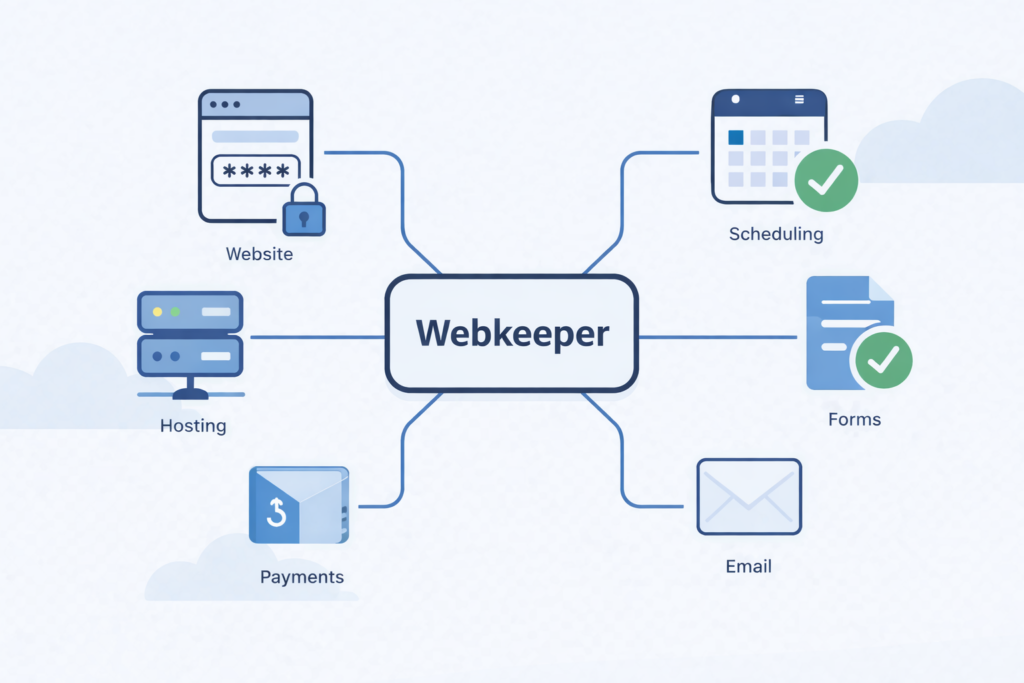
If you run a small business, a church, a municipality, or a community organization, you depend on things that live on the web. Your website is one of them. But it’s probably not the only one. There’s also the payment portal where your customers pay their bills. The scheduling system where your patients book appointments. The forms your constituents fill out for permits or registrations. The grade portal parents check every week. The public agendas your board posts before every meeting. The event registration your members use to sign up for the mission trip. All of that is web-based. All of it needs to keep working. And most of it was set up by someone, at some point, and nobody inside your organization fully understands how it all connects anymore. That’s what webkeeping is. It’s the ongoing management, maintenance, and care of everything your organization does on the web. It’s Bigger Than Your Website We’ve been providing website maintenance services since 1999. For a long time, that described the work pretty well. A client would call and say “can you change the phone number on the contact page” or “we need to add the new holiday hours,” and we’d handle it. Usually within a few hours. We still do that, every day. But over the years, the work grew. Clients started asking us to set up their payment portals. Connect their scheduling tools. Build their online forms. Manage integrations between systems that were never designed to talk to each other. And when any of it broke — when the scheduling vendor pushed an update that changed everything, when the payment processor changed its requirements, when a form stopped working after a plugin update — they called us. They didn’t call because they wanted to learn how to fix it themselves. They called because they had patients to see, meetings to run, customers to serve. They needed someone to just handle it. “Website maintenance” doesn’t really cover that anymore. Webkeeping does. What Does a Webkeeper Actually Do? Think of it like a bookkeeper. A bookkeeper doesn’t just balance one account. They manage your books — all of them, ongoing, so you don’t have to think about it. A webkeeper does the same thing for everything your business does on the web. Here’s what that looks like in practice: Website updates and changes. Text, images, pages, new content, design tweaks. The core of what we’ve always done, and what we’ll keep doing. Operational systems. Payment portals, scheduling tools, online forms, document repositories, event registration, member directories. The stuff your customers, patients, constituents, and members actually use to interact with your organization. Third-party tool management. Your web presence probably relies on a half-dozen tools from different vendors — your hosting, your CMS, your email platform, your form builder, your payment processor, your scheduling widget. Each one has its own updates, its own pricing changes, its own occasional breakdowns. A webkeeper keeps track of all of it so you don’t have to. Triage when things change. And things are changing faster than ever. Your scheduling vendor gets acquired and announces a new interface. Your form builder sunsets the version you’ve been using. Your CMS pushes an update that breaks an integration you didn’t even know existed. A webkeeper gets the call, says yes, and figures it out. Why Now? The honest answer: the web is getting more complicated, not less.Every tool your business uses is adding AI features, changing its interface, adjusting its pricing. New tools are launching every week that claim to solve problems you’re not sure you have. Your inbox has pitches from vendors you’ve never heard of. And your web person — the freelancer who set up your site five years ago — may not be around much longer. A lot of small web shops and independent operators are closing as the industry shifts. When that happens, their clients don’t stop needing help. The dentist’s scheduling system still needs to work. The town’s payment portal still needs to accept water bill payments. The church’s event registration still needs to function for the fall retreat. Those clients need a webkeeper. Someone who picks up the phone, says yes, and handles it — the way it’s always been done around here. How Is Webkeeping Different From Website Maintenance? It’s not different. It’s bigger. Website maintenance is part of webkeeping — the part focused specifically on your website. Webkeeping covers the website plus everything else web-based that your organization depends on. If it runs in a browser and your business needs it to work, it falls under webkeeping. Think of it this way: a plumber doesn’t just fix toilets. A plumber handles everything connected to your water systems — sinks, water heaters, pipes, drains, supply lines. You call a plumber and whatever the water problem is, they handle it. A webkeeper is the same idea for everything your business does on the web. Whatever the web problem is, we handle it. Parker Web Has Been Doing This Since 1999 We just didn’t have the word for it until now. For 27 years, we’ve been the people small businesses and community organizations call when something on their web isn’t working, or when they need something changed, or when a vendor makes their life complicated. We answer the phone. We say yes. We fix it. We resolve about 5,000 support requests a year, and in 2023, our clients gave us a 99% “very satisfied” rating. We’re a U.S. company with U.S.-based employees, serving clients in 31 states. We work in WordPress, Joomla, Shopify, HubSpot, Squarespace, and most other web platforms. If it’s on the web and your business depends on it, we can help. That’s webkeeping. And we’d love to be your webkeeper. Have questions about webkeeping services or want to find out if Parker Web is a good fit for your organization? Give us a call at 877-321-2251 or get started here. It doesn’t cost anything for an initial evaluation.
Freshen Up Your Online Presence: Tips for Website Spring Cleaning 🌱

Discover expert tips and strategies for revitalizing your online presence with our comprehensive guide to website spring cleaning. Learn how to optimize content, streamline navigation, enhance visual appeal, and more for a polished and engaging website experience.
Ensuring Longevity: Strategies for Maximizing Your Website’s Lifespan

In the ever-evolving digital landscape, the lifespan of a website can vary greatly. Factors like technological advancements, changing consumer preferences, and algorithm updates constantly shape the online environment. However, there are strategies you can employ to prolong your website’s existence and maintain a strong online presence. Here are some tips to help maximize your website’s lifespan: By implementing these strategies and staying proactive in managing your website, you can maximize its lifespan and ensure a strong online presence for years to come. Remember, the digital landscape is constantly evolving, so staying informed and agile is key to staying ahead of the competition.
7 Key Tips for Fostering a Thriving Website Developer Partnership

In the world of digital presence, collaboration between website developers and their clients is the cornerstone of successful projects. Whether you’re a business owner seeking a website or a developer working with clients, establishing a thriving partnership is essential for achieving mutual goals. The synergy between both parties can significantly impact the website’s quality, functionality, and success. Here are seven fundamental tips for fostering a productive and prosperous website developer partnership: Remember, a strong partnership between a client and a website developer is a collaborative effort based on trust, communication, and mutual respect. By implementing these tips, both parties can create a fruitful alliance that successfully creates and maintains an exceptional website.
Users Love the Smell of Fresh Content

Creating great content is essential for attracting and retaining an audience. However, creating it is just the beginning. Regularly updating your content is crucial to maintaining its relevance, visibility in search engines, and quality user experience. Why Update Content? Steps to Update Content Effectively: Best Practices for Content Maintenance: In conclusion, content updates are pivotal in keeping your audience engaged. Following these steps and best practices ensures your content remains relevant, valuable, and visible in search engine results. Remember, consistency and quality updates over time can significantly impact your site’s performance and help you stay ahead in the digital landscape.
Hits and Misses in the Current Landscape of Web Development

In the ever-evolving realm of web development, trends emerge, technologies evolve, and methodologies shift. The industry is in perpetual flux, with some strategies proving to be game-changers while others falling short of expectations. In this blog post, we’ll explore what’s working and what’s not in the world of web development, shedding light on the successes and challenges developers face today. What’s Working: What’s Not Working: In Conclusion: Web development is a dynamic field, marked by both progress and persistent challenges. Embracing emerging technologies while addressing the existing shortcomings is vital for developers to stay ahead. Prioritizing accessibility, performance optimization, security, and streamlined development workflows will shape a more resilient and efficient web development landscape. As the industry continues to evolve, adaptability, continuous learning, and a focus on user-centric solutions will define success in web development. By acknowledging both the successes and the hurdles, developers can pave the way for a more inclusive, efficient, and secure web for all users.
Understanding the Divide: Front-End vs. Back-End Web Development

The digital landscape has transformed exponentially, ushering in an era where web development is the cornerstone of innovation. Behind the seamless interfaces and powerful functionalities lie two integral components: front-end and back-end development. These aspects collectively shape the web experience but operate in distinct realms, each with its unique responsibilities, technologies, and challenges. Front-End Development: Crafting User Experiences Front-end development refers to the visible aspects of a website or web application—the elements users interact with directly. It primarily enhances user experience through design, layout, and interactivity. Front-end developers employ a combination of languages and frameworks like HTML, CSS, and JavaScript to create visually appealing and responsive interfaces. HTML (HyperText Markup Language) forms the structural foundation of web pages, defining the content’s hierarchy and layout. CSS (Cascading Style Sheets) complements HTML by styling and beautifying the content, controlling colors, fonts, and overall visual presentation. JavaScript, a dynamic scripting language, adds interactivity, enabling functionalities such as animations, form validations, and dynamic content updates. Key Aspects of Front-End Development: Back-End Development: Powering Functionality and Data Management On the flip side, back-end development focuses on the server side of websites and web applications. It deals with the behind-the-scenes functionalities, databases, and server operations that enable the front end to function effectively. Back-end developers work with server-side languages like Python, Ruby, PHP, and Java and frameworks like Node.js, Django, Flask, Laravel, and more. Key Aspects of Back-End Development: Collaborative Synergy and Full-Stack Development: While front-end and back-end development function distinctly, they are interconnected, forming a symbiotic relationship essential for a fully functional web application. Full-stack developers adeptly navigate both domains, possessing expertise in front-end and back-end technologies. Their comprehensive understanding enables them to create end-to-end solutions, streamlining communication between the user interface and server-side functionalities. In Conclusion: Front-end and back-end development represent the dual pillars that uphold the modern web. While front-end focuses on enhancing user experiences with visually appealing interfaces, back-end ensures the smooth functioning of applications through server-side functionalities. Though different in their focus, both domains are intrinsically linked, creating a cohesive web ecosystem that continually evolves to meet user needs and technological advancements. Understanding the distinctions between front-end and back-end development equips aspiring developers and businesses with the knowledge to build robust, engaging, and functional web experiences that resonate with today’s dynamic digital landscape.
Preparing Your Website for a Successful Year-End

Introduction: As the end of the year approaches, businesses and website owners must ensure that their online presence is ready for the upcoming challenges and opportunities. Whether you run an e-commerce site, a blog, or a corporate website, preparing for the year-end can significantly impact your success in the coming year. In this blog post, we’ll explore essential steps to ensure your website is in top shape as you bid farewell to the current year and welcome the new one. Conclusion: By preparing your website for the end of the year, you’re setting the stage for a successful start to the new one. These steps will enhance the user experience and contribute to the overall success and growth of your online presence. So, gear up, make those necessary updates, and get ready to welcome the opportunities the upcoming year offers!
Keeping Your Website Content Fresh: It’s Never Truly ‘Finished

In the dynamic world of the internet, your website should be viewed as a living entity that evolves and adapts over time. Just because your website is “done” doesn’t mean it’s finished. To keep your online presence relevant, engaging, and practical, it’s crucial to refresh and update your content consistently. In this blog post, we’ll explore why maintaining fresh content is vital and provide helpful tips on how to do it effectively. 1. The Importance of Fresh Content Imagine your website as a virtual storefront. Would you want to visit a store with dusty shelves and outdated products? The same principle applies to your website. Here are some compelling reasons why keeping your content fresh matters: A. SEO Benefits: Search engines, like Google, reward websites that regularly update their content with higher rankings. Fresh content indicates your website is active and relevant, which can improve your search engine optimization (SEO) efforts. B. User Engagement: Outdated content can bore your visitors and deter them from returning. Fresh content keeps users engaged, encourages repeat visits, and leads to a more positive user experience. C. Authority and Trust: Consistently updating your content demonstrates your commitment to staying current and relevant in your field, establishing your website as a trusted source of information. 2. Strategies for Keeping Content Fresh Now that we understand the importance of maintaining fresh content, let’s delve into some strategies to accomplish this: A. Regular Blog Posts: Create a blog or news section on your website and commit to posting regular updates. Share industry insights, company news, and helpful tips to keep your audience informed and engaged. B. Content Calendar: Plan your content updates using a content calendar. This ensures you have a steady stream of fresh content and prevents lapses. C. Evergreen Content: Balance timely posts with evergreen content. Evergreen content addresses timeless topics that remain relevant, offering lasting value to your audience. D. Update Existing Content: Revisit and refresh older posts, pages, or articles. Update statistics, reformat for readability, and add new information to keep the content current. E. Multimedia Elements: Incorporate different types of content, such as videos, infographics, and podcasts, to diversify your content and appeal to a broader audience. F. User-Generated Content: Encourage user-generated content, such as comments, reviews, or guest posts, to keep your website interactive and demonstrate a community of engaged users. G. Social Media Integration: Promote your fresh content on social media platforms to expand your reach and attract more visitors to your website. 3. Analytics and Feedback To ensure your efforts to keep content fresh are effective, use website analytics tools to track visitor engagement, page views, and conversion rates. Pay attention to feedback from your audience through comments, emails, and social media. These insights will help you refine your content strategy over time. Conclusion Remember, the concept of a “finished” website is obsolete. To thrive online, you must continuously update and refresh your content. By doing so, you’ll improve your SEO rankings and engage your audience, establish trust, and remain a credible source of information in your field. Treat your website as a living entity, and it will reward you with increased traffic and improved online success.